
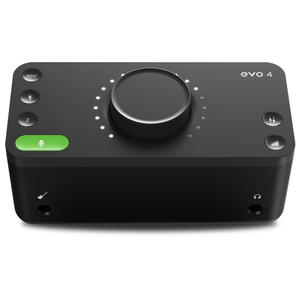


Compact unit with friendly features ideal for media sound video production on the fly with good quality sound outcome. A software such as Logic is required as EVO is an interface.
Quality: 5
Value for money: 4

Sold by Mannys
The information on this page is based solely on product reviews written by customers of Mannys via Trustpilot.
Brand: Audient
GTIN: 5060374260368
Compact unit with friendly features ideal for media sound video production on the fly with good quality sound outcome. A software such as Logic is required as EVO is an interface.
I have used quite a few small interfaces recently and needed a small one for my tour. The price point was spot on as well as the small form factor and ease of use. The real surprise was the outstanding quality of the sound!
Great product

Smart gain doesn't work. Occasionally there is a crackling/popping noise that comes through repeatedly when my IEMs are connected. Having higher volume also introduces a lot of hiss.
Simple plug and play interface that sounds great.
Great audio interface, easy to use
Great audio interface at good price. The quality of the recorded audio is outstanding and the automated features make many production tasks super easy.

A great interface, easy to use (after a small learning curve) and configure. Simple switching between DAW and PC. Headphone volume could do with a little more oomph but certainly not a deal-breaker. Two "gotcha's" to be mindful of. 1. Out of the box the level mixing is set 100% to the input device, zero for the PC you're connected to. If you can't hear sound from your PC or your DAW, play with the mixing. 2. Windows 10 might not set the device as the default sound-source, regardless of your connection. Run the Windows troubleshooting wizard and default will be enabled. You might have to do this each time you disconnect the EVO. Haven't tested that much to know