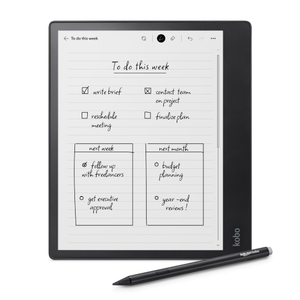
This is a nice piece of hardware, and most of my problems are with the software, so perhaps in time it will improve, for now it's barely enough of an improvement to be worth trying. It's best at writing in the dark without waking up fully, and it's also excellent at drawing grid maps for virtual tabletop role playing games. I also use it as a way to capture arbitrary notes and doodles, but it has many frustrations when used for that purpose.
There's 2 things this product is excellent at, superior to anything else I'm aware of:
1. To record notes in the middle of the night without turning on a light bulb. The screen can be turned down to 1% brightness, which is just enough light to write by when your eyes are night adapted. Without this I would try to write in complete darkness, waking up in the morning to find unreadable marks, or I would turn on my computer to use a text editor and be blasted with way too much light, even with night mode turned fully on. But now I keep the Elipsa near my bed when I sleep so that if I remember anything in the middle of the night I can record it without blasting my sleepy retinas.
2. To sketch a grid aligned map to use in a virtual table top role playing game. There is software specifically for doing that on PC, but that software only works well when your mental concept matches what the program was designed for. The Kobo Elipsa 2e is superior because you can sketch anything you think of, knowing what aligns with what, in a flexible and intuitive way that is similar to using paper. It is better than using paper because it digitizes cleanly and perfectly, where with paper I need to photograph the page, correct the lighting, and struggle with a grid that isn't quite square. With the Elipsa, the finest grid is exactly 40 pixels with no offset, and the medium and large grids are 80 pixels and 120 pixels.
There's one other purpose I got this product for, but I can't tell if it's better than much cheaper alternatives.
I wanted to use this device to capture notes. It seems like it would work well for this, with a stylus that replicates a ballpoint pen, with notes that can be transferred to PC without relying on any servers I don't control. On the PC I have great flexibility in the organization of information, but don't always carry my computer with me, so I want a single point of entry that I can take with me. However there's many frictions and frustrations that mean pen and paper is at least as good as this, and of course paper is much cheaper. While many frustrations are with the software, and so have the chance to be improved in updates, there are a few frustrations that are hardware problems with the stylus, so I can't be certain of how much it can improve.
My biggest frustration is the hardware design of the highlight button. I never use it on purpose. My natural grip is in the position of the highlight button, meaning every 8 lines or so it ruins whatever I'm trying to do. Why isn't the button near the eraser? I never have a problem clicking closed a ballpoint on accident. I hope there is an update soon where I can remap the buttons, because then I will disable that button. It's so annoying that I have considered drilling out the switch. If I had the right tools I would have done so already.
The second largest problem seems to be a hardware problem with the stylus tip. Sometimes when I'm writing the switch that detects surface contact gets stuck in the contact position, so even when I lift the pen a line continues underneath it. When it gets sticky it tends to stay sticky for a while. I don't know what causes this to happen or to stop happening. I could compensate by lifting the pen far enough up to lose tracking, but that's high enough that it's unnatural to the way I write. Maybe I should replace the stylus tip, but I've only been using it for 3 weeks and this was a problem just a few days from when I unpacked the Elipsa new from the factory.
While this is a good e-ink pen display tablet, I don't know if it's better than pen and paper. Pen and paper is a surprisingly strong contender. Paper doesn't crash. Paper doesn't get hacked. Paper doesn't need charging. Paper has zero latency, good contrast, and very high resolution. If I want to change the order of two pages, I can do so. When I hold a pen in my hand, there's no chance of it mutating into a different tool when I don't want it to. I wonder if Kobo is paying too much attention to computers and not enough to its strongest, most ancient of competitors.
I suppose this device is also an e-book reader. But I already have a device for that, and if I'm taking notes I want to be able to see the book I'm referencing as I'm taking notes. So I have no plans to use it for that purpose. I did buy one book just to test it out, and taking 4 clicks to switch to the notes, take a note, and 4 clicks to switch back to the book is too much friction, so I won't be doing that again. I can't even see the part I'm taking notes of if I do that. I know I can write in the book with this, but I prefer to keep notes separate, that way I have room for my own thoughts.
Quality: 4
Value for money: 3